The eBPF network monitoring provides deep visibility into the network communication of your applications by tracking critical DNS, TCP, and socket metrics directly from the kernel. Unlike traditional network monitoring that focuses on infrastructure connectivity, this solution delivers network insights in the context of your specific applications and services—helping you to answer "Is it the application or the network?"
This capability provides deep packet-level network analysis directly from the kernel, helping to eliminate the need for additional network analysis tools while delivering granular network telemetry correlated with your application performance data. You can use these metrics to diagnose connectivity issues, pinpoint performance bottlenecks, and track data throughput—all within the context of the specific applications and services that matter to your business.
IP address metadata
For comprehensive network visibility and troubleshooting capabilities, the eBPF network monitoring collects IP addresses as part of network connection metadata. This includes both source and destination IP addresses for TCP connections, DNS queries, and other network communications. IP address data is essential for:
- Identifying connection endpoints and network paths
- Tracking network dependencies between services
- Diagnosing connectivity issues and performance bottlenecks
- Correlating network metrics with specific applications and services
Network metrics data is retained according to your New Relic data retention settings. You can configure data retention periods through your account settings or by contacting your account team for custom retention requirements. For more information, refer to Manage data retention. If you don't wish to collect source and destination IP addresses for network communications, please don't instrument eBPF network monitoring.
Network monitoring capabilities
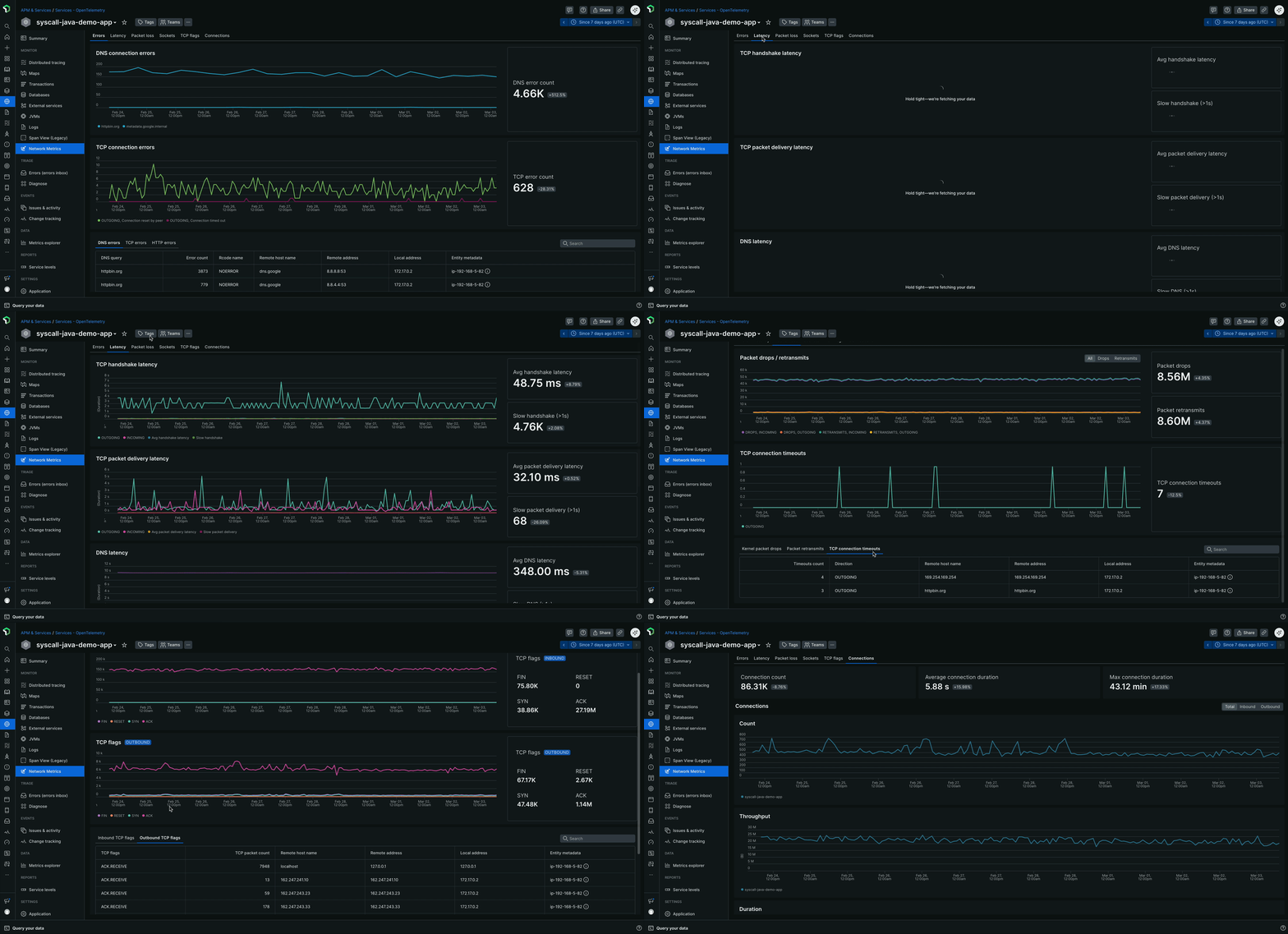
The network metrics dashboard provides comprehensive network analysis through six specialized tabs, designed to guide you through a systematic troubleshooting workflow:
Network monitoring tabs
The network monitoring dashboard is organized into the following tabs, each providing specific insights to help you diagnose and resolve network-related performance issues:
Errors: The Errors tab is your starting point for diagnosing network issues, helping to provide a comprehensive view of all network-related errors. This includes:
- DNS connection errors and error counts
- TCP connection errors and error counts
- HTTP errors such as 4xx and 5xx status codes, along with their counts and trends over time
Latency: The Latency tab offers detailed insights into network performance by tracking critical timing metrics, including:
- TCP handshake latency, which measures the time taken to establish a TCP connection
- TCP Packet delivery latency, which indicates how long it takes for packets to be transmitted and acknowledged
- DNS resolution latency, which shows how long it takes to find an IP address for a domain name
Packet loss: The Packet loss tab helps you identify network reliability issues by tracking:
- Kernel-level packet drops, which indicate packets that were dropped by the operating system
- TCP connection timeouts, which occur when a connection fails to establish within a specified time frame
- Packet retransmissions, which happen when packets are lost and need to be resent
Sockets: The Sockets tab provides insights into system-level connection issues, including:
- Socket errors and their counts, which can indicate problems with buffer allocation, memory constraints, or file descriptor limits
TCP flags: The TCP flags tab offers deep visibility into TCP connection states, including:
- Inbound TCP flags, which show the state of incoming connections through SYN, ACK, FIN, and RST packet analysis
- Outbound TCP flags, which show the state of outgoing connections through SYN, ACK, FIN, and RST packet analysis
Connections: The Connections tab provides comprehensive connection metadata for both inbound and outbound traffic, including:
- Connection counts, which show the number of active connections over time
- Connection duration statistics, which indicate how long connections are maintained
- Process-level details, which provide insights into which applications are generating network traffic
Use cases
- Troubleshooting slow external API calls: When applications show degraded response times to external services, network metrics can help to identify whether the issue stems from TCP handshake delays, packet loss, or retransmission problems rather than application logic.
- Root cause analysis for performance degradation: Correlate application performance issues with network-layer problems by examining TCP connection health, packet delivery latency, and connection state changes.
- Inter-service communication monitoring: Monitor the health of microservice-to-microservice communication across your entire cluster, identifying network congestion or routing issues between services.
- External dependency troubleshooting: Quickly identify when performance problems originate from external API endpoints or third-party services by analyzing outbound network patterns and connection quality.
Deployment options
You can enable eBPF network metrics in two ways depending on your current monitoring setup:
For existing New Relic APM customers: If you already have New Relic APM agents deployed, you can add eBPF network metrics alongside your existing instrumentation. The eBPF agent operates in network-only mode, complementing your APM data with kernel-level network insights without disrupting your current setup. For more information, refer to the Enable network metrics-only mode for existing APM customers section.
For more comprehensive monitoring: Deploy the full eBPF agent with both eBPF APM and network metrics capabilities for complete observability across application, infrastructure, and network layers. This approach provides unified telemetry collection through a single agent.
Both deployment options provide the same network monitoring capabilities described below.
Enable network metrics-only mode for existing APM customers
If you already have New Relic APM agents deployed and want to add network visibility without modifying your current APM instrumentation, you can configure the eBPF agent to operate in network metrics-only mode. This provides kernel-level network insights that complement your existing APM data.
When network metrics-only mode is enabled, the eBPF agent automatically detects the presence of existing New Relic APM agents on your system and intelligently suppresses eBPF APM data collection to avoid conflicts. This seamless integration allows you to maintain your current APM instrumentation while gaining additional network-layer visibility, ensuring both monitoring solutions work together to help avoid duplication.
For Kubernetes environment
Linux host environment
View the eBPF network monitoring data
You can view the eBPF network monitoring data in the New Relic APM UI:
- Go to one.newrelic.com > APM & Services.
- Select the desired eBPF entity.
- In the Monitor section, click Network Metrics. The network metrics displays.
Dica
The eBPF agent automatically generates entity names differently depending on the environment:
In hosts or Docker, these names are a combination of the process name, its directory or container ID, and the listening port. For example,
ruby:/home/ubuntu/app:[5678]orjava:f4aead533895:[8080].In Kubernetes, these names are derived from the service name for example,
mysql-database-service.
Assigning custom name to applications:
- You can assign a custom name to your application by setting the
NEW_RELIC_APP_NAMEenvironment variable for both Kubernetes and on-host applications.
eBPF APM
Learn how to use New Relic's eBPF-powered APM for zero-code, language-agnostic application monitoring with automatic service discovery.
Troubleshooting eBPF
Learn how to troubleshoot issues with the New Relic eBPF agent.
eBPF best practices
Learn about best practices for using the New Relic eBPF agent.