preview
We're still working on this feature, but we'd love for you to try it out!
This feature is currently provided as part of a preview program pursuant to our pre-release policies.
New Relic's smart alerting shows how well your entities are covered against recommended monitoring standards, then lets you create or adjust alert conditions to improve that coverage. You work by entity type, applying conditions to many entities at once and adjusting individual ones as needed.
Benefits of smart alerts
Setting up alerts manually is slow, and coverage gaps are easy to miss. Creating one condition for one entity can take 20 to 40 clicks, so an account with 100 to 200 entities means thousands of clicks and hours of work. It's also hard to know what's covered, and noisy or stale conditions pile up and cause alert fatigue.
Smart alerts solve this in one place. The Alerts Overview page shows how your entities measure up to recommended standards. From there, you apply best-practice conditions across many entities in about five or six clicks, and fix noisy conditions in bulk instead of one entity at a time.
Smart alerts help most when you're setting up alerting for the first time, when you don't have a dedicated observability team, or when you manage 50 or more entities. If you're new to alerting, you don't build conditions from scratch. Once New Relic has enough signal history, it recommends the standard conditions for your entities, each with a preset threshold. You keep the ones that fit, adjust the ones that need it, and disable or delete the rest. If you already have conditions in place, you can see which entities still lack coverage and which standards they meet, then close the gaps in a few steps.
Tip
If you already have established alert configurations, test smart alerts in a staging or non-production environment before you apply changes to production.
Key concepts
- Standards coverage: A standard is a recommended, best-practice alert for an entity type. For example, APM services have a Response time standard, and synthetic monitors have a Failures standard. Each standard can bundle one or more alert conditions. Conditions outside a standard don't count toward coverage. Standards coverage measures how many of your entities have a standard's recommended conditions. It shows your current coverage and doesn't create conditions for you. Because you work at the standard level, you can create or edit conditions for many entities of one type at once.
- Recommended thresholds: New Relic generates a threshold for each entity intelligently — either from rules for well-known metrics or from the entity's own signal behavior — which reduces the operational overhead of manual configuration. You can review and adjust these recommended thresholds to fit your needs.
Entity types and Standards coverage
Smart alerts currently scopes Standards coverage to the following entity types. Entity types not listed here are not supported and won't appear in standard coverage.
Entity type | Standards coverage |
|---|---|
Services (APM) |
|
Browser applications |
|
Mobile applications |
|
Synthetic monitors |
|
Hosts |
|
Tip
For hosts, coverage percentages aren't calculated. Because host entities are added and removed frequently, the count shown includes both currently reporting and non-reporting hosts.
Requirements
Smart alerts are available to all paid New Relic accounts that opt into the public preview.
- View: Any user in an opted-in account can view the Alerts Overview page.
- Create, manage, edit, and delete: Any full platform user in the account can manage coverage, including conditions created by other users.
Tip
Smart alerts are account-scoped. You can't view or manage alert coverage across multiple accounts from a single view.
Access smart alerts
To review coverage, and manage alert quality at scale in the New Relic UI, select Alerts > Alerts Overview. This page is separate from the existing Overview and Issues & activity pages, which continue to show your alert events and activity.
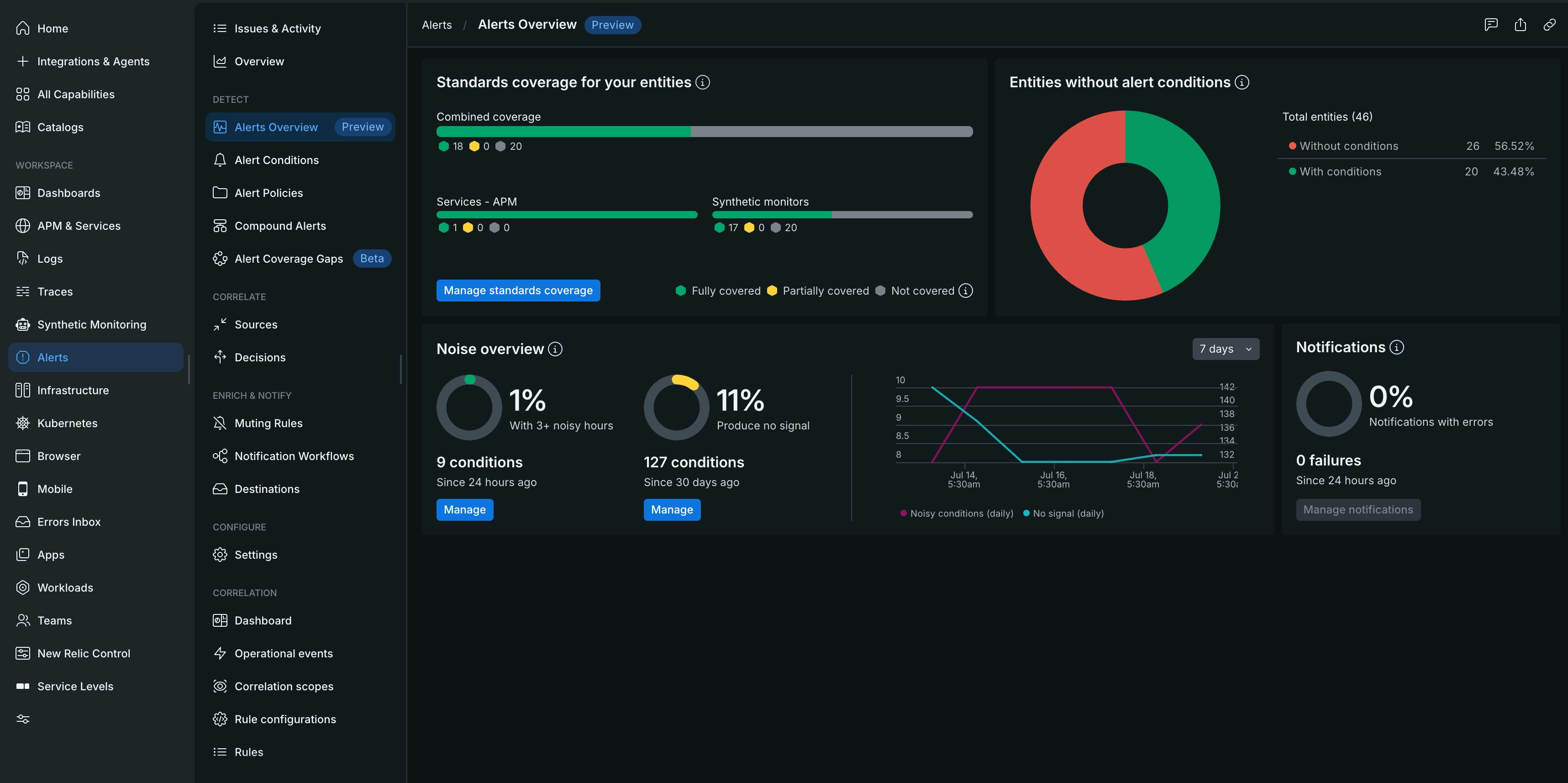
From the Alerts Overview page, you can:
- Check how many of your entities do and don't have alert conditions set.
- Check how many of your entities meet recommended standards coverage, grouped by entity type.
- Proceed to manage standards coverage by creating or adjusting conditions. Refer to Analyze and improve alert coverage.
- Check noisy conditions or conditions that no longer produce a signal, and proceed to manage them. Refer to Manage alert quality.
Next steps
Analyze and improve alert coverage
Find coverage gaps and apply recommended standards across your entities.
Manage alert quality
Reduce noise and clean up conditions that produce no signal.
Alert coverage gaps and condition recommendations
Identify individual uncovered entities and add recommended alert conditions.
Create an alert condition
Build and customize alert conditions manually.