Microsoft は、2025 年末までに Teams の Microsoft 365 Webhook ベースのコネクタ サービスを廃止する予定です。 New Relic 一括通知を引き続き受け取るには、ワークフロー アプリを使用して Microsoft Teams 内でワークフローを作成できます。 このドキュメントでは、Teams チャネルでのスムーズな移行と中断のないアラートを確保するために、New Relic 一括宛先とワークフローを更新する手順を説明します。 Office 365 コネクタ サービスの廃止の詳細については、 Microsoft 開発者ブログを参照してください。
前提条件:
- Microsoft Teams で New Relic アラート用の新しいワークフローを作成します。 ワークフローを作成したら、POST リクエスト URL をコピーします。 この URL は New Relic で必要になります。 詳細については、 Teams でワークフローを作成するための Microsoft のドキュメントを参照してください。
Microsoft Teams ワークフローに New Relic Webhook を追加するには:
既存の Webhook の宛先を更新します。
- one.newrelic.com > All capabilities> Alerts > Enrich and Notify > Destinationsに移動します。
- 編集するには、Microsoft Teams にリンクされている必要な Webhook の宛先をクリックします。
- Teams でワークフローを作成した後、 Endpoint URL [エンドポイント URL]フィールドで既存の URL を新しい URL に置き換えます。
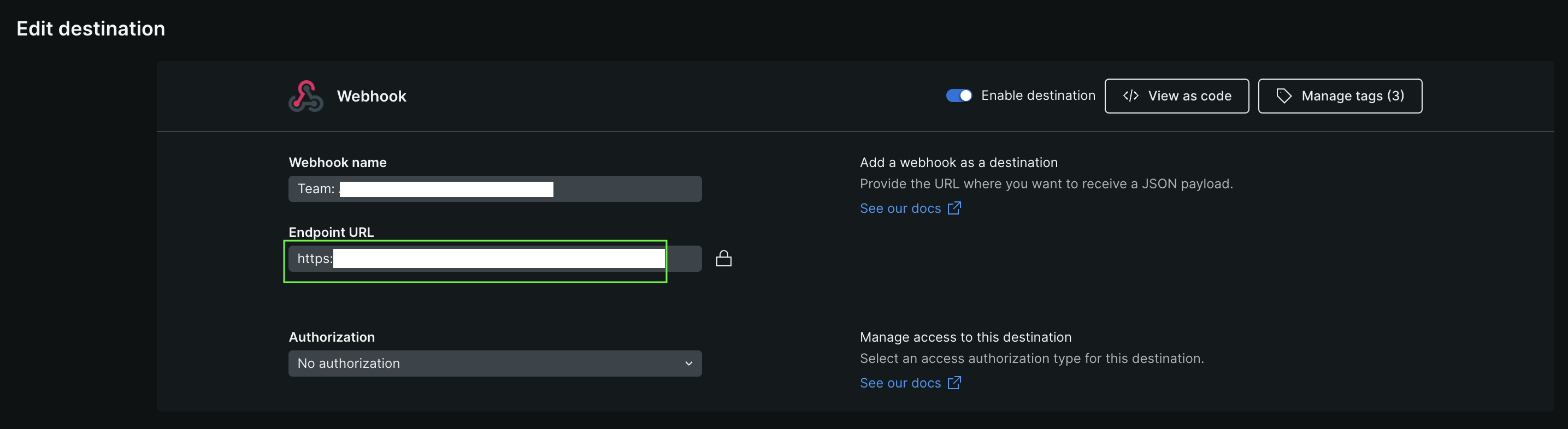
- Update destination [宛先の更新]をクリックします。
既存の Webhook ワークフローを更新します。
- one.newrelic.com > All capabilities> Alerts > Enrich and Notify > Workflowsに移動します。
- 通知ペイロードを編集するには、宛先にリンクされている必要なワークフローをクリックします。
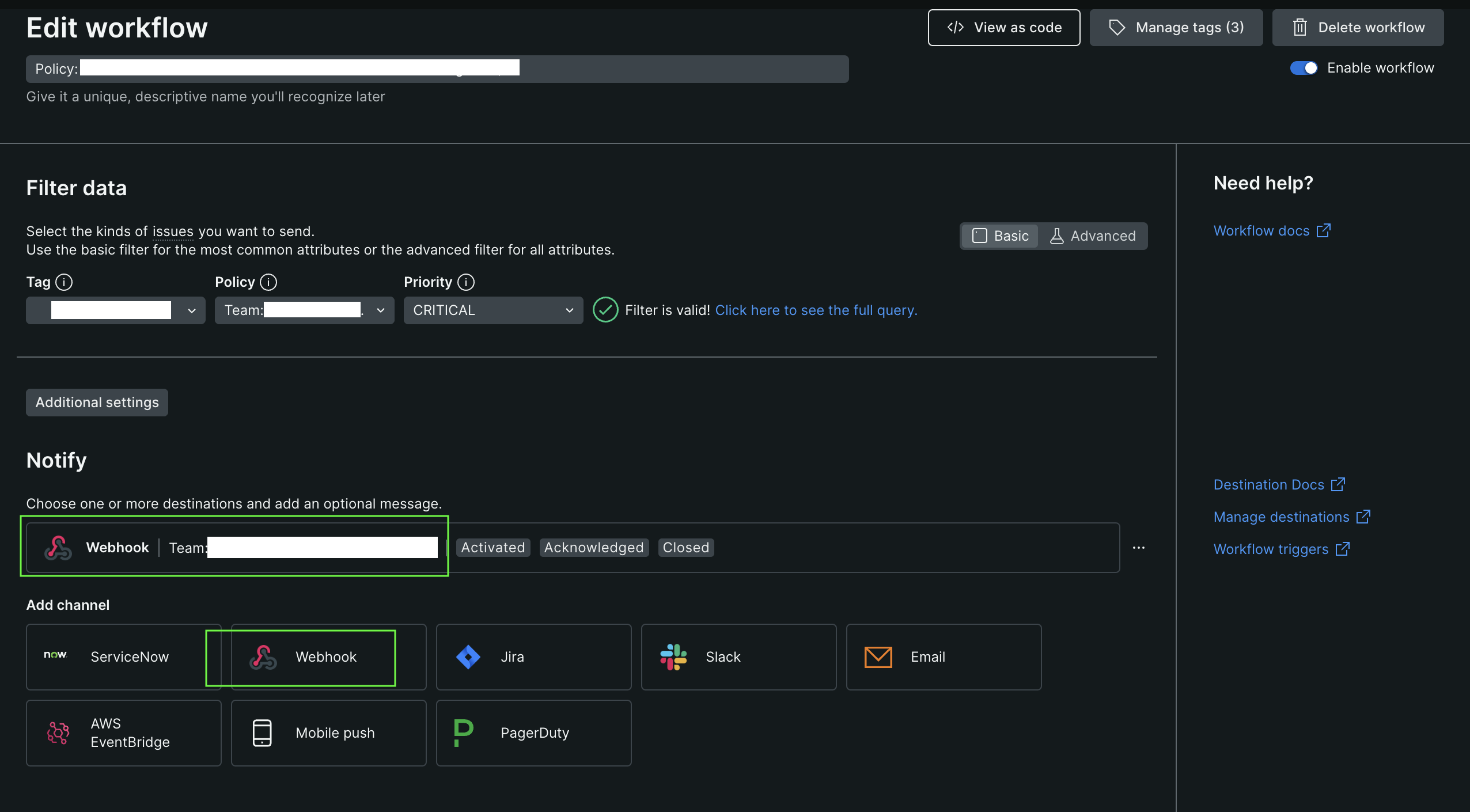
- Edit notification message画面のTemplate [テンプレート]フィールドに、次のペイロードをコピーして貼り付けます。{"type": "message","attachments": [{"contentType": "application/vnd.microsoft.card.adaptive","contentUrl": null,"content": {"$schema": "http://adaptivecards.io/schemas/adaptive-card.json","type": "AdaptiveCard","version": "1.2","msteams": { "width": "full" },"body": [{"type": "ColumnSet","columns": [{"type": "Column","items": [{"type": "Image","style": "Person","url": "https://avatars.slack-edge.com/2022-06-02/3611814361970_f6a28959c2e7258660ea_512.png","size": "Small"}],"width": "auto"},{"type": "Column","items": [{"type": "TextBlock","size": "large","weight": "bolder","text": "{{ priorityText }} priority issue is {{#if issueClosedAt}}CLOSED{{else}}{{#if issueAcknowledgedAt}}ACKNOWLEDGED{{else}}ACTIVATED{{/if}}{{/if}}"},{"type": "TextBlock","size": "large","wrap": true,"maxLines": 2,"weight": "bolder","text": "[{{ issueTitle }}]({{ issuePageUrl }})"}],"width": "stretch"}]},{{#if accumulations.conditionDescription.[0]}}{"type": "TextBlock","text": {{ json accumulations.conditionDescription.[0] }},"wrap": true},{{/if}}{{#eq "Not Available" violationChartUrl}}{{else}}{"type": "Image","url": {{ json violationChartUrl }}},{{/eq}}{"type": "FactSet","facts": [{"title": "*Impacted entities:*","value": "{{#each entitiesData.names}}{{#lt @index 5}}{{this}}{{#unless @last}}, {{/unless}}{{/lt}}{{/each}}"},{{#if accumulations.policyName}}{"title": "*Policy:*","value": {{ json accumulations.policyName.[0] }}},{{/if}}{{#if accumulations.conditionName}}{"title": "*Condition:*","value": {{ json accumulations.conditionName.[0] }}},{{#eq impactedEntitiesCount 1}}{{else}}{"title": "*Total Incidents:*","value": {{ json impactedEntitiesCount }}},{{/eq}}{{/if}}{"title": "Workflow Name:","value": {{ json workflowName }}}]},{"type": "ActionSet","actions": [{"type": "Action.OpenUrl","title": "📥 Acknowledge","url": {{ json issueAckUrl }}},{"type": "Action.OpenUrl","title": "✔️ Close","url": {{ json issueCloseUrl }}}{{#if accumulations.deepLinkUrl}},{"type": "Action.OpenUrl","title": "🔎 View Query","url": {{ json accumulations.deepLinkUrl.[0] }},"mode": "secondary"}{{/if}}{{#if accumulations.runbookUrl}},{"type": "Action.OpenUrl","title": "📕 View Runbook","url": {{ json accumulations.runbookUrl.[0] }},"mode": "secondary"}{{/if}}]}]}}]}
- Save message [メッセージを保存]をクリックします。